FREE

Leavoda provides 14 days free trial!

Unify online and in-person payments.

Send invoices, collect with a Square or Stripe card reader or the Leavoda mobile app, and track every transaction — built for field crews.
hero image
Why Leavoda Payments

One payments system for the office and the job site

Stop juggling a separate POS. Leavoda connects invoicing, your Square or Stripe card readers, and mobile collect payment so cash flow stays tied to real work.

Unify commerce

Online invoice links and in-person card payments live with the same clients, jobs, and reports.

Get paid faster on site

Techs collect tap, chip, or PIN before they leave the driveway — fewer unpaid invoices.

Scale with your crew

Pair readers to the mobile app and let each technician collect without a front-desk checkout.

Secure by design

PCI-compliant flows and certified Square or Stripe hardware keep card data out of your team’s hands.

In-person payments

Unify online and on-site payments

Leavoda Payments works with Square and Stripe — so your team can invoice online and collect cards in the field with a reader or the mobile app, in one place.

Choose your gateway

Connect the gateway you already use. You keep your own Square or Stripe account, pay their standard rates, and Leavoda adds no markup.

Payment gateway

Square

  • Square Terminal — all-in-one handheld checkout
  • Square Reader — tap, chip, and PIN

Payment gateway

Stripe

  • Tap to Pay on iPhone and Android — no extra hardware
  • BBPOS WisePad 3 — Bluetooth chip and PIN reader
  • CloverComing soon
  • PayPalComing soon
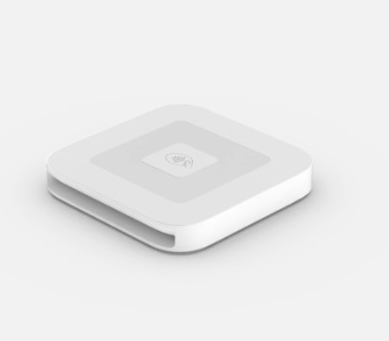
Square Reader (2nd generation) contactless card reader

Card reader

Card readers for field crews

Connect the reader that matches your gateway so technicians can take tap, chip, or PIN payments right after the job — professional checkout without a separate POS.
  • Pair your reader from the Leavoda mobile app
  • Accept tap, chip, and PIN — including Visa, Mastercard, and Interac
  • Collect payment before your crew leaves the job site
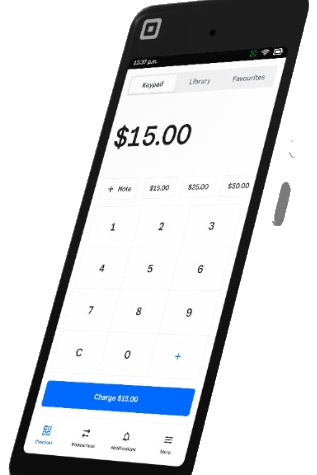
Leavoda mobile app for collecting payments

Mobile app

Collect from your phone or tablet

Use the Leavoda mobile app to start Collect Payment on an invoice — with a connected reader, Tap to Pay, manual card entry, or cash, cheque, and other methods.

  • Invoice and collect from the same mobile workflow your techs already use
  • Type a card manually when a reader isn’t available
  • Online and in-person payments land in one Leavoda transaction history

Hardware includes Square Terminal, Square Reader, Tap to Pay on your phone, and the BBPOS WisePad 3. Leavoda links the reader to your account so payments stay with your jobs, invoices, and reports.
hero image
Card reader

Accept cards the moment the job is done

Connect the reader that goes with your gateway. Your crew starts Collect Payment in the Leavoda mobile app, taps or inserts the card, and the payment posts to the invoice automatically.

Square or Stripe hardware

On Square, use a Square Reader for chip, PIN, and contactless, or a Square Terminal for full handheld checkout. On Stripe, use Tap to Pay on iPhone and Android, or a BBPOS WisePad 3 Bluetooth reader.

Tied to your jobs

In-person charges stay with the invoice, job, and client in Leavoda for clean payouts and reconciliation.
hero image
Mobile workflow

Collect payment from the Leavoda mobile app

Whether you have a reader paired or need a backup method, Collect Payment keeps the field workflow simple: open the invoice, choose how to get paid, and finish the job.

Reader or manual card

Use a connected Square reader, or type a card when hardware isn’t on hand.

Cash, cheque & more

Record cash, cheque, e-Transfer, PayPal, and other methods with optional notes, dates, and references.
hero image

Expand your business with Leavoda

Ready to take your business to the next level? Sign up for a free trial today and see how Leavoda can help you work smarter.

+6

Hours saved weekly

+23%

Average growth

3x

Jobs secured

+18%

Leads converted

+6

Hours saved weekly

+23%

Average growth

3x

Jobs secured

+18%

Leads converted
Invoicing & cash flow

From invoice to paid — without leaving Leavoda

Create professional invoices, offer secure online pay links, and follow up automatically while field payments stay in sync.

Instant invoicing

Create and send branded invoices that match the work your team just completed.

Secure online checkout

Clients pay by card through secure Square or Stripe checkout when they’re not on site.

Payment reminders

Reduce overdue balances with automated follow-ups on pending invoices.

Partial payments

Accept deposits or partial amounts to improve cash flow and client flexibility.

Transaction history

See receipts and payment history tied to each invoice and client.

Financial reporting

Track income and outstanding balances without exporting to a separate tool.
hero image
How it works

Up and collecting in a few steps

Most teams go live with online payments first, then add a card reader when crews need card-present checkout.

1. Activate payments

Activate Leavoda Payments so your business can invoice and collect funds.

2. Invoice from Leavoda

Create invoices after visits and send secure pay links to clients online.

3. Pair a card reader

Order a Square Reader or Square Terminal, or use Stripe Tap to Pay or a BBPOS WisePad 3, then connect it from the Leavoda mobile app.

4. Collect on the job

Open Collect Payment, take the card (or another method), and keep every transaction with the job.

Try Leavoda Today

Book your demo today or start a free trial immediately.

Frequently Asked Questions

Need more info? Contact our support team.

Square and Stripe. Pick the one you already use, connect your account, and Leavoda adds no markup on their fees. Each gateway brings its own in-person hardware: Square Terminal and Square Reader, or Stripe Tap to Pay and the BBPOS WisePad 3.

Yes. Connect a Square reader (Square Terminal or Square Reader) or use Stripe Tap to Pay or a BBPOS WisePad 3 in the Leavoda mobile app, so your team can collect tap, chip, or PIN payments after the job — alongside online invoices.

Both work. With Stripe you can take tap payments on the phone itself using Tap to Pay — no extra hardware. You can also pair a reader, or collect with manual card entry, cash, cheque, e-Transfer, and other methods.

Leavoda supports major credit and debit cards (including Visa, Mastercard, and Interac where available), plus cash, cheque, e-Transfer, PayPal, and other recorded methods — so clients can pay the way they prefer.

Yes. Online payments and in-person collections appear in your Leavoda transaction history with the related invoice, job, and client — for simpler reporting and follow-up.

No. Leavoda adds no markup on Square or Stripe processing fees. You keep your own gateway account and pay their standard rates.

Payments run through secure, PCI-compliant flows. Supported Square and Stripe readers are designed for secure in-person card acceptance so your team doesn’t handle raw card data.